
Free steps
Does Google's AI show your site? How to read the new report

Search Console has a Generative AI performance report. It reports impressions for your site in AI Overviews and AI Mode. The site-wide chart can count two results from your site in the same AI feature as one impression. Google's Search Console Help page says: "As of August 31, 2026, we've rolled out these insights to all websites worldwide." It costs nothing to open. It tells you whether Google's AI features showed your links, which is a better starting point than guessing.
Five steps to read it
Each step that works with an AI tool has a prompt you can copy with one tap. Fill in the [BRACKETED] parts, then paste it into ChatGPT, Claude or Gemini.
Open the report
Sign in to Search Console and pick your site. In the menu, open Performance, then tap Generative AI. The page is headed Generative AI features. If you have never used Search Console, verify your site first.
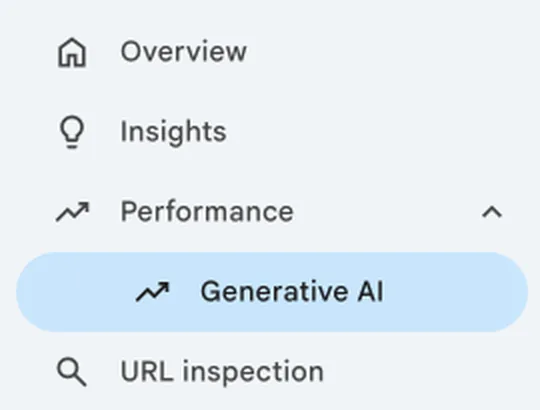
The menu in Search Console: Performance, then Generative AI. If you can't see it, check two things
The same Help page says this "usually happens when your site hasn't received enough impressions" in these features, and that it may be because "you've excluded your site" from them. In Search Console, open Settings, then Search generative AI, and check whether your site is included or follows an included setting.
Read what it gives you
You get one measure, total impressions, with tabs for pages, countries, devices and days. When we opened the report in November 2026 it had no clicks column. An impression means your link appeared in a result Google counted; it does not prove someone saw the link or visited your site.
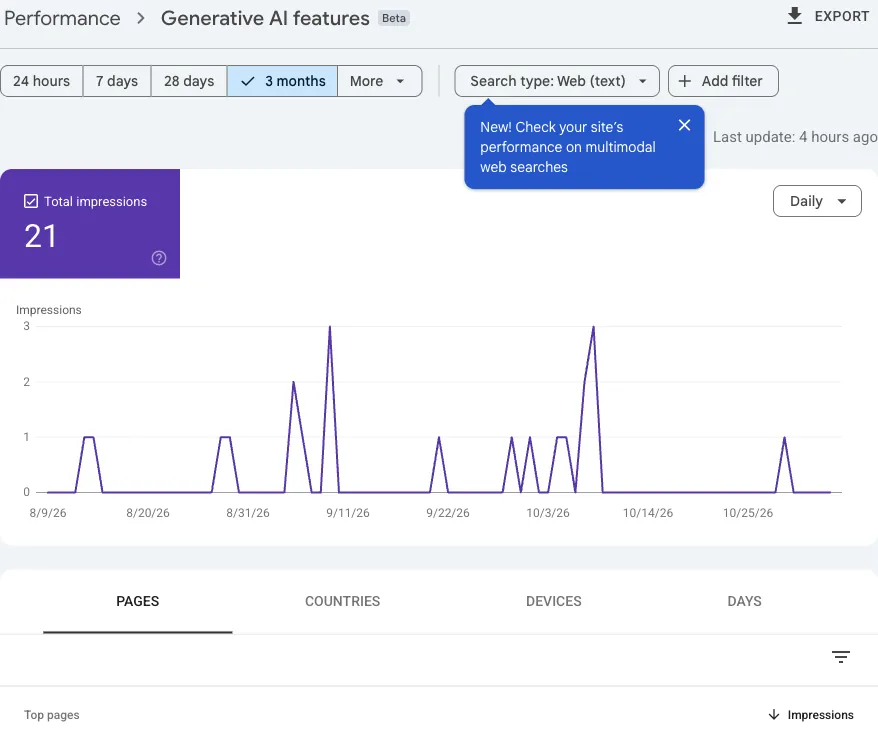
One small site's report. There is a Total impressions tile, a chart and the four tabs. There is no clicks column. Tap Export, copy the Pages table, then paste it into the prompt below. The prompt asks the AI to explain it, not to guess.
I run [YOUR BUSINESS TYPE]. My website is [YOUR SITE URL].
Below is the Generative AI performance report from Google Search Console for [DATE RANGE]. It counts impressions only: how often my links appeared in Google's AI Overviews and AI Mode. It has no clicks column, and an impression does not prove anyone saw the link or visited my site.

[PASTE YOUR TABLE HERE]

Please:
1. Explain in plain English what each column means.
2. List my top 5 pages by impressions and say in one line what each page seems to be about, going only by its URL.
3. Tell me what I can and cannot conclude from this table.
Do not invent numbers or reasons I have not given you. If something is unclear, ask me.
What you should get back: A plain-English explanation of each column, your top 5 pages by impressions, and a short list of what the table can and cannot tell you.
Limit: The AI only sees the table you paste. It cannot see your live report, and it cannot tell you why a page was shown. Check its summary against your own report.
Compare your pages

Open the page with the most impressions and one with few. Note what the stronger page has: a real customer question, your own numbers, something you saw on the job. Treat this as a clue, not proof of why it was shown.
Paste the text of both pages into the prompt to get a side-by-side comparison.
Here are two pages from my website. Page A shows up often in Google's AI features. Page B shows up rarely. These are impressions, not clicks.

Page A: [PAGE A URL], [PAGE A IMPRESSIONS] impressions
[PASTE PAGE A TEXT HERE]

Page B: [PAGE B URL], [PAGE B IMPRESSIONS] impressions
[PASTE PAGE B TEXT HERE]

Compare them. What does page A have that page B does not? Look for things like a real customer question answered up front, the owner's own numbers, something seen on the job, or a clear author and date.
Treat your list as clues, not proof of why Google showed page A. Then ask me up to 3 questions about my real experience that would let me add something useful to page B. Do not make up facts for me.
What you should get back: A short list of differences between the two pages, plus up to 3 questions about your real experience that would help you improve the weaker page.
Limit: The list is a set of clues. The AI cannot know why Google showed one page and not the other, and a page can be shown for reasons that are not on the page.
Check again next month
Add one of those things to a weaker page. Note the edit date, then compare the same page over equal-length periods before and after the edit, using the same filters. A change shows timing, not cause.
Not sure where to start? Paste your table to shortlist up to three pages. The AI will then ask for each page's text and your business facts before suggesting edits.
Here is my Google Search Console Generative AI report data (impressions only, no clicks) for [DATE RANGE]:

[PASTE YOUR TABLE HERE]

My business is [YOUR BUSINESS TYPE] and my goal is [YOUR GOAL, for example more enquiries].
Make a provisional shortlist of up to 3 of these pages that look worth improving first and say why in one line each. You cannot see the pages yet, so do not suggest edits. Instead, ask me to paste the text of each shortlisted page and the facts about my business that it should include. After I send them, suggest one edit per page using only what I gave you.
Then write me a short note to keep: the page, the edit date, and how I will compare the same page over two equal-length periods before and after, using the same filters.
Remind me that a change shows timing, not cause, and that nothing guarantees my pages appear in AI answers.
What you should get back: A provisional shortlist of up to three pages and a request for each page's text. After you paste it, one edit idea per page and a short note recording the edit date and how you will compare before and after.
Limit: Nothing guarantees your pages will appear in Google's AI answers. The report counts impressions, not clicks, so use it as a starting point and judge the result against the enquiries your business actually gets.
What the report cannot tell you
It covers Google's AI features only, so it says nothing about ChatGPT or other assistants. It does not say which questions showed your link, and it does not show sales or enquiries. Use it to see where you already appear, then judge the result against what your business actually gets.

Small, steady edits you can measure beat big rewrites you cannot.
One practical SEO and AI visibility check when we publish one. No spam.
By subscribing you agree that Ranklore may email you these tips. Unsubscribe any time by replying "stop".Sources
Search Console Help: Generative AI performance report (Search).
Google: New opportunities, control and insights for website owners.
Want a wider look at your site? Try the free website check or say hello.